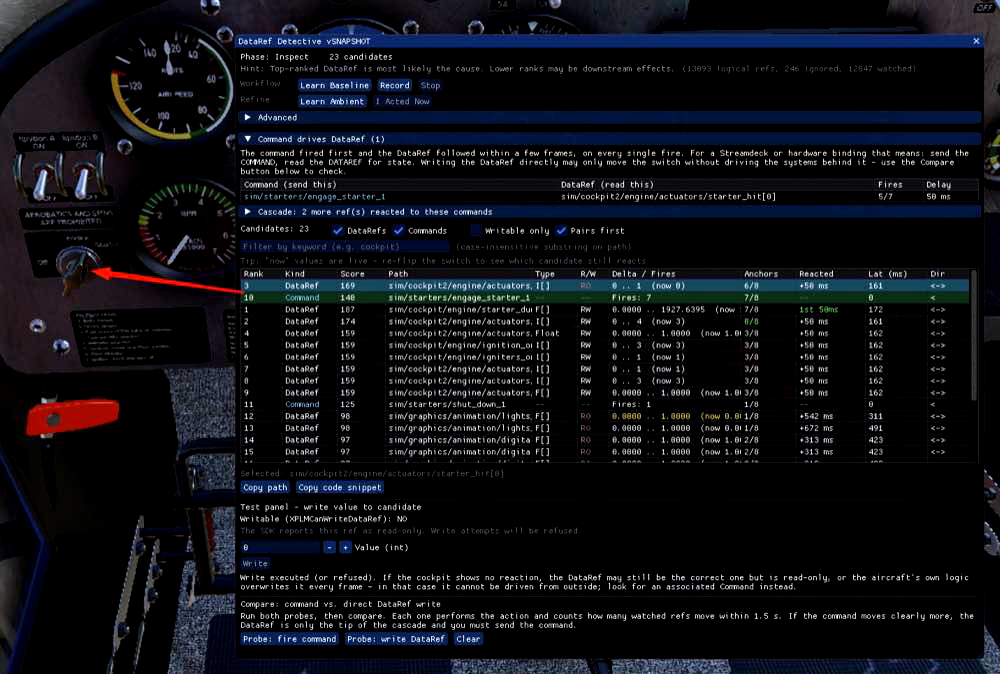

DataRef Detective

DataRef Detective is a plugin for X-Plane 12 designed to identify DataRefs and commands that are not explicitly published by aircraft, allowing users to discover the correct DataRefs for custom switch interactions. This tool correlates behavior instead of relying on names, capturing changes triggered by cockpit interactions. It enables the recording and inspection of DataRefs, helping to build compatible profiles for hardware panels or Stream Decks. With features like noise marking and real-time value assessments, DataRef Detective streamlines the customization process.

0.0 / 5
81 downloads
Screenshot 1

Description

Many aircraft don't publish their own DataRefs. Instead they reuse unrelated default sim/... DataRefs for custom switches — a fuel cut switch may live in mixture_ratio_all, a bus tie in bleed_air_mode. Searching by name fails completely.

DataRef Detective takes a different approach: it watches every DataRef and command and finds the one that changes in step with the switch you just flipped. Perfect for building Stream Deck or hardware panel profiles.

How it works

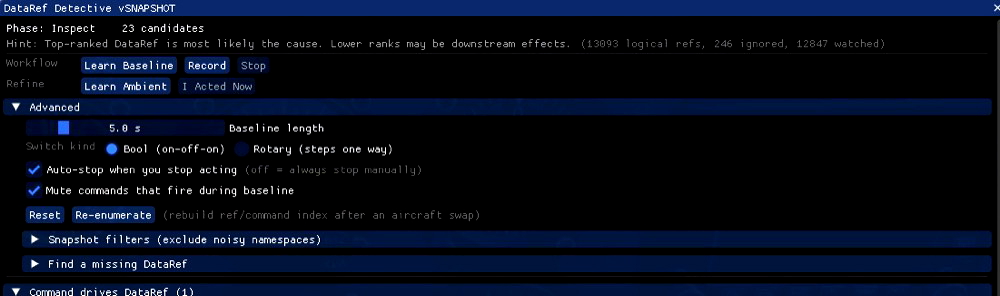
  1. Take Snapshot — while the cockpit is settled, the plugin learns which DataRefs change on their own (engine vibration, voltage drift, animations) and ignores them.
  2. Record — work the switch with the mouse a few times. Every cockpit click counts automatically.
  3. Inspect + Test — candidates are ranked by how well they follow your clicks. Write a test value to confirm, then copy the path or a ready-to-paste code snippet.

Features

  • Finds DataRefs and commands by behavioural correlation, not by name
  • Tells you what to bind: send the command, read the DataRef for state
  • Ranks the cause before its downstream effects
  • Mark Noise subtracts cascades of dependent DataRefs (lights, radios, annunciators)
  • Finds commands registered at runtime by scanning cockpit objects and Lua / SASL scripts
  • Live values after recording to break ties between candidates

Open it via Plugins → DataRef Detective.

Installation

  1. Download xp_sherlock_dataref.zip and unzip it.
  2. Copy the xp_sherlock_dataref folder into X-Plane 12/Resources/plugins/.
  3. Restart X-Plane.

Changelog

  • v1.2.1 04. Oct 2026
    What's New in v1.2.1:

    A stability release — a user reported X-Plane crashing as soon as they clicked Learn Baseline. The report came without a log or OS, and the crash does not reproduce on macOS. This release fixes the one platform-specific crash path found in that code, makes sure no exception of ours can take the sim down, and adds log lines so the next crash report points at its cause.

    Fixed: Windows crash when the aircraft folder contains non-ASCII file names — Learn Baseline (and the automatic re-enumeration after an aircraft load) scans the aircraft folder for command names. On Windows, file names were converted through the system ANSI code page, and that conversion throws for any character the code page cannot represent: a livery named in Greek, Polish, Cyrillic or Chinese, or one containing an emoji, was enough. The exception was not caught and terminated X-Plane.
    All paths received from X-Plane are now handled as UTF-8 end to end (std::filesystem::u8path / u8string), and files are opened through std::filesystem::path, which uses the wide-character API on Windows.

    macOS and Linux were not affected; their paths are UTF-8 natively.
    Fixed: Windows did not find the stock Commands.txt under non-ASCII install paths — same root cause, no crash. If X-Plane was installed under a path containing, for example, an umlaut (C:\Users\Jürg\X-Plane 12), the stock Resources/plugins/Commands.txt could not be opened and the plugin silently fell back to its small built-in command list, so most stock commands were never watched. Fixed by the same UTF-8 path handling.

    Exceptions can no longer crash X-Plane — every callback X-Plane calls into the plugin now catches exceptions and turns them into a log line instead of letting them unwind into the sim. Look for [xp_sherlock] ERROR: ... threw: ... in Log.txt.

    The window draw callback, which covers every button, including Learn Baseline, Record and Re-enumerate.
    The deferred re-enumeration after an aircraft load.
    The recorder's flight loop, which on an exception falls back to Idle and stops itself rather than failing again every frame.

    Log lines that locate a crash — Learn Baseline is the first time the plugin reads every DataRef of every installed plugin. A third-party plugin with a broken DataRef accessor crashes inside its own code, where no plugin can catch it. New one-time log lines (none per frame) show where in the sequence a crash happened, by the last [xp_sherlock] line in Log.txt:
    Enumerating N datarefs ... — while listing DataRefs (array sizes from other plugins).
    Scanning aircraft assets in <path> ... — while scanning the aircraft folder for commands.
    Baseline: reading N refs ... without ... seeded. — while reading another plugin's DataRef values.

    ---
    Reporting a crash — please attach X-Plane 12/Log.txt from the crashed session, and say which OS, aircraft and other plugins you use. Without the log there is no way to tell what went wrong.

Comments

Add Your Review
User avatar
robwell99 04. Oct 2026
As you don't say what Aircraft, what Plattform, no logs ... I can't help you in any case. I use it on MacOS (ARM) and have absolut no issues. I have setup an profile for the xp_streamdeck for the Bell 412 and no problems at all. So please maybe you search for the plugin on github there you can add more information about our issue and I happy to help you. Thank you.
User avatar
DrPredrag 02. Oct 2026
It crashed XP12 when I clicked on "Learn baseline". Is that a way to use it at all?

Download

Version: 1.2.1
Size: 1.83 MB
Uploaded: 04. Oct 2026

Author

robwell99

Joined Aug 2021

Contributors

No contributors listed.

Requirements

  • • X-Plane 12 or later

Information

Release Date 01. Oct 2026
Downloads 81
Rating No ratings yet
Category Utilities / Applications